Now on iOS, Android, Mac and the web

The podcast app we always wanted

A fast, private podcast player that gets out of your way. Organize every show, listen anywhere, and pick up exactly where you left off.

  • Free core player
  • 4.7 ★ App Store
  • No ads. No trackers.
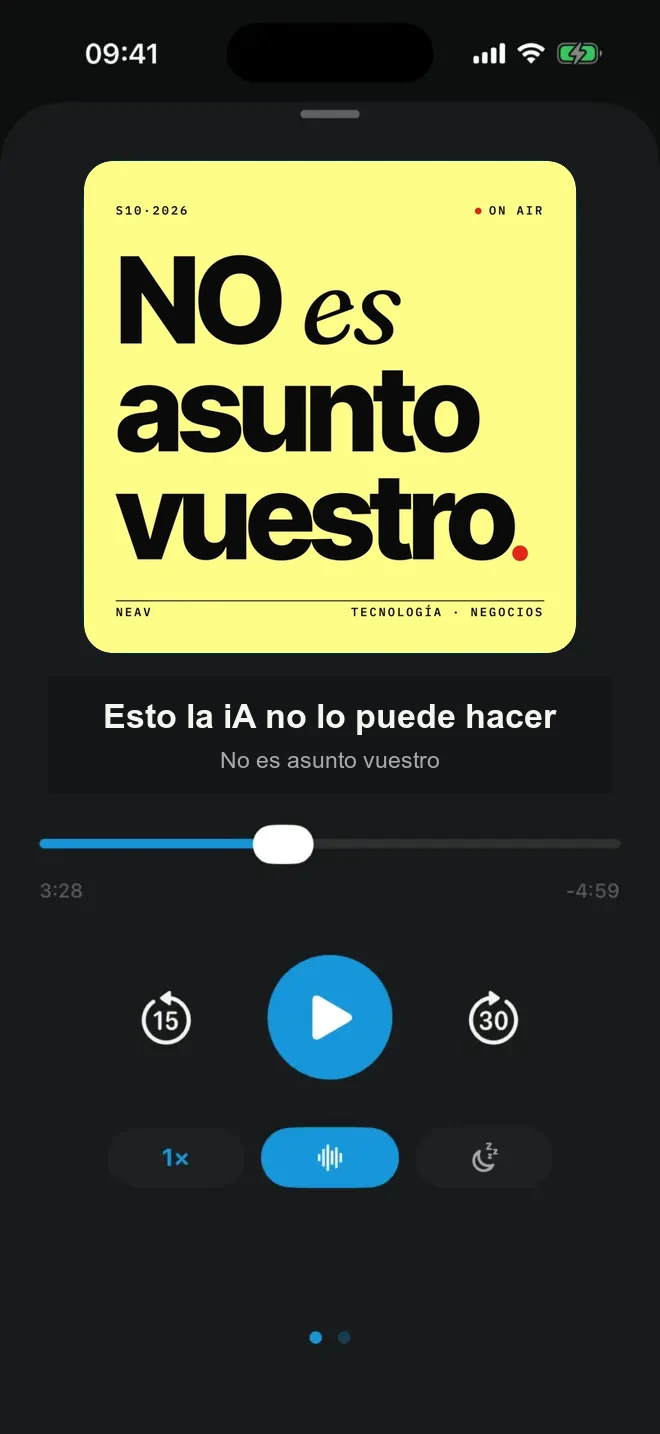
PulsarCast now-playing screen with speed, Voice Boost and sleep timer
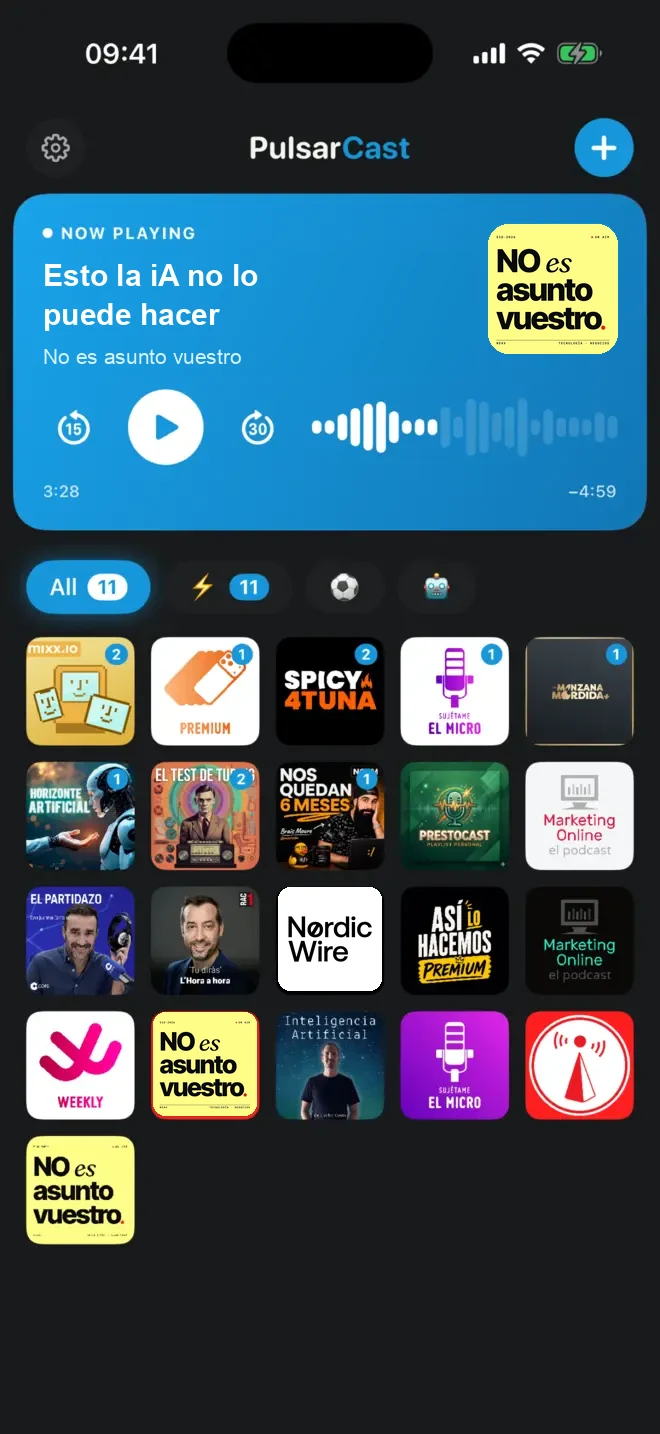
PulsarCast home screen with player, podcast lists and show artwork
Your podcastsOpen RSS, private feeds and OPML
Your dataNo advertising or third-party tracking
Your choiceWorks without an account or subscription
Your devicesOptional passwordless sync everywhere
Built for people who really listen

Powerful where it matters. Quiet everywhere else

Everything you expect from a serious podcast app, without turning listening into admin.

Make your library yours

Group shows into colored lists, filter them by duration, age or keywords, pin favorites, archive episodes and choose exactly what appears on your home screen.

  • Smart lists and continuous queues
  • Grid, list and Minimal mode
  • Import and export OPML
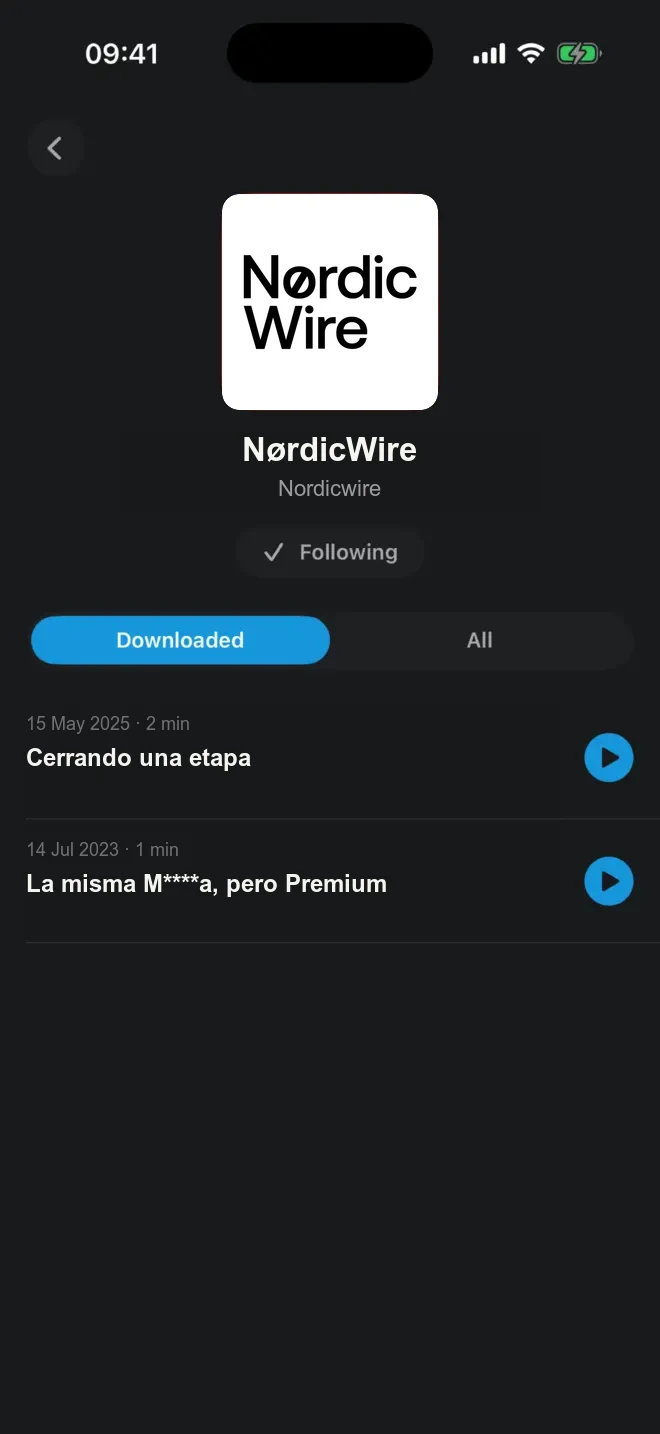
A podcast and its downloaded episodes in PulsarCast

Hear every voice clearly

Voice Boost evens out volume. Pitch-corrected speed keeps people sounding natural, while Smart Speed trims silence and tracks the time you save.

Ready before you are

New episodes download in the background. Listen offline, sync progress and downloads, and automatically clean up finished or older files.

Playback, your way

Chapters and links, sleep timer, configurable skip buttons, per-show speed, intro and outro skipping, and a queue you can reorder at any time.

Every screen, in sync

iPhone, iPad, Mac, Apple Watch, CarPlay, Android, Android Auto, widgets and the web. Start on one device and continue on another.

Alerts that respect you

Choose which shows can notify you, mute any podcast, or let an Ultra smart list alert you only when a new episode matches your rules.

Looks like your app

Light, dark, AMOLED, sepia and Liquid Glass looks, custom accent colors, alternate icons and controls you can hide when you want less.

PulsarCast 2.2 · Rolling out

Faster, steadier and better everywhere

Version 2.2 tightens the daily listening experience across iPhone, iPad, Mac, Apple Watch, CarPlay and Android.

01

Artwork, instantly

Episode images are preloaded and cached so lists and player screens feel immediate.

02

Up Next you can trust

Queued and partly played episodes resume correctly and stay clearly identified everywhere.

03

Reliable reordering

Drag podcasts and episodes into place without items disappearing or losing their position.

04

A cleaner home

Latest Episodes and Downloads are now optional sections, controlled from Settings.

05

CarPlay, reorganized

Home, Up Next, Podcasts, Downloads and lists now have a clearer structure, with working synced speed control.

06

Apple Watch, upgraded

Improved playback, downloads and iPhone control, plus a new quick-launch complication.

07

Better OPML moves

Export from the iOS share sheet and get a clear confirmation when an import finishes.

08

Accurate time saved

Listening Stats now combines playback-speed savings with the time recovered by Smart Speed.

09

Fresh Ultra icons

New alternate app icons are available consistently across iOS and Android for Ultra members.

10

Polish throughout

Language, swipe deletion, sync, stability and small interface issues have all been tightened.

PulsarCast Ultra

Turn anything into something you can listen to

Ultra adds AI listening tools, your own audio and the full web player — all tied to the same library you already use.

Best web price €60 / year €5/month, billed yearly
Articles become episodes

Podcastify a link, article, PDF or pasted text — in your chosen language.

Ask every episode

Get a summary, ask questions, extract cited links and detect ads or skippable sections.

Ask your whole library

Find the right episode for a topic, guest, commute or question without digging.

Automate smart lists

Auto-download, notify, queue and clean up episodes that match your filters.

Your own audio, everywhere

Upload and organize personal audio, or send voice notes, links and files from Telegram.

Remember and reuse ideas

Save favorites and timestamped bookmarks with notes, then sync, share or email them.

Web and desktop player

Use the full PulsarCast experience in any browser, synced with your phone.

Your personal digest

Get a daily or weekly email with new episodes from the shows you follow.

Secure checkout by Stripe. Use the same email in PulsarCast to unlock Ultra on every device. The core podcast player stays free.

Good to know

Questions, answered

Is PulsarCast free?

Yes. Core podcast listening — search, following shows, lists, downloads, offline playback, queue, chapters and more — is free. Ultra is optional and adds AI tools, advanced automation, personal audio and web access.

Does PulsarCast show ads or track me?

No. PulsarCast has no advertising and no third-party trackers, and we never sell your data. You can use the core player without creating an account.

Can I move from another podcast app?

Yes. Import an OPML file to bring your subscriptions across, and export them again whenever you want. You can also paste public or private RSS feeds and Spotify show links.

Which devices are supported?

PulsarCast runs on iPhone, iPad, Mac, Apple Watch and Android, with CarPlay, Android Auto, widgets and a web player. A free passwordless account keeps your library and progress in sync.

How does a web subscription unlock the apps?

Subscribe with your email, then sign in to PulsarCast with that same address. Your Ultra entitlement follows your account across supported Apple, Android and web devices.

Can I cancel Ultra whenever I want?

Yes. A web subscription can be managed from PulsarCast's billing portal, and an in-app subscription from your App Store or Google Play account. Cancelling stops the next renewal.

Start listening

Your podcasts are waiting

Free to download. No ads. No trackers. No account required.